Archive for 2009

Internet Explorer strips leading whitespaces in text nodes

For some mysterious reason, Internet Explorer (tested in IE7 and IE8) strips leading spaces in text nodes preceded by an empty element, such as this:

<div><span></span> foo</div>

While innoccuous in static pages, it becomes problematic when DOM nodes get updated after a delay by some Javascript, as the separating whitespace has disappeared, hence ruining the layout of your text.

Surprisingly, I haven’t found any reference to this IE bug (not that there is a shortage of complaints about other IE idiosyncrasies), so I thought I’d share the problem and the solution I have found here. It’s all demonstrated in the following example:

< !DOCTYPE HTML PUBLIC "-//W3C//DTD HTML 4.01//EN" "http://www.w3.org/TR/html4/strict.dtd">
<html>
<head>
  <title>IE Whitespace Bug</title>
  <script type="text/javascript">
    function fill(name) {
      var e = document.getElementById(name);
      e.innerHTML = ‘hello’;
    }
  </script>
</head>
<body onload="fill(‘hello1′); fill(‘hello2′);">

<h1><span id="hello1"></span> world</h1>
<h1><span id="hello2">&nbsp;</span> world</h1>

</body>
</html>

In the first case, the whitespace gets stripped, thus resulting in “Helloworld”. In the second example, the non-breaking space prevents IE from stripping the whitespace, so that when the span is filled by Javascript, the text reads “Hello world” as expected.

If you know other solutions or whether it’s considered a bug that will be fixed, please post in the comments!
“XMMS2 Collections” presentation at Metaweb

On my way to the Google Summer of Code Mentor Summit 2009, I accepted DraX’s invitation to give a 1-hour talk about XMMS2 Collections at his work, i.e. Metaweb, in San Francisco.

The topic was somewhat relevant for them as it’s reminiscent of MQL, the query language they developed for Freebase. It’s worth noting that although both share a pool of buzzwords such as “graph”, “loosely-structured”, “querying”, etc, they are not quite the same:

  • Freebase is essentially a giant graph-database, which you query with MQL to retrieve graph fragments.
  • The XMMS2 database is a flat denormalized store, which you query with graph-structured Collections to retrieve a list of entries.

Note: Collections 2.0 should however allow fancier querying to retrieve tree-shaped structures.

About 10-20 people showed up and listened to me blurbing about the concept of Collections, the rationale behind them, the API, Collections 2.0, possible UI uses, what it represents for the user, pointers to S4, etc.

It’s all in those over-engineered slides that I have no choice but to put online, under Creative Commons Attribution-Share Alike 2.5 License, for them to live on forever on the internets. And yes, it’s still either in evil Keynote format (source), or in PDF.

Oh and Metaweb, thanks for the food!

“Music Player” session at the GSoC Mentor Summit 2009

Thanks to Google’s everlasting generosity, mentors from all Open Source projects that participated to the Google Summer of Code 2009 have flocked en masse to Mountain View to meet up and talk about code and drink beer. More in pictures in my Bay Area Flickr set, if you’re curious.

Sessions were organised spontaneously around various topics, and one of which, proposed by Amarok2’s Lydia/nightrose, was “Problems Audio Players face today”. Which resulted in 15-20 people from various projects (incl. Amarok2, Rockbox, Maemo, XMMS2 & others) talking about solving problems encountered by all music player developers (e.g. lyrics and cover art fetching), as well as features on our beloved users’ wishlists (portable player support, tags, musicbrainz, etc).

And if you weren’t there, don’t despair, for I just (finally) posted minutes for this session on the GSoC wiki. Some interesting ideas in there, so go and have a look, and get to work!

Embrace the community (Ep. I: The Fandom Menace)

Or why and how the new XMMS2 GUI client should be extensible (and what I mean by extensible anyway).

Quizz: What do Winamp, Foobar2000, Emacs, Eclipse and Firefox have in common?

(Vim users, we love you too, but shut up for now please.)

They are very popular and they highly promote extensibility.

Now, we all know that correlation != causation. What is certain, however, is that all those projects boast many fan(boy)s, some of whom even get quite religious about it.

This enthusiasm reflects itself in the emergence of strong communities: people who share content, tips, modules, extensions, themes, configurations, scripts, etc. And those people usually aren’t even core developers of the software, sometimes not developers at all; just users or hobbyists who like the project.

Paradoxically, most of what they share is aimed at personalizing the software, i.e. making it the user’s own, fitting the user’s wishes and needs. This creates a feeling of ownership and satisfaction, because the user can bend it the way she likes and master it like a pro.

In essence, the idea here is give power to people to shape the software the way they want, and they will extend it in creative ways and get together to share these extensions. And I think that encouraging this creative freedom is one of the many factors which contribute to popularity.

Obviously, each of the projects mentioned above have their own way of allowing user extensions.

  • Classic Winamp 2.* had (lots of) theme and some plugins (mostly effects, visualization), but remained otherwise quite static in terms of interaction or features.
  • foobar2000 goes much further with theming and interface customization, allowing varied usage and user experience.
  • Eclipse focuses mainly on extension modules (to interact with the VCS, manage project workflow, etc) and a jungle of configuration options.
  • Firefox boasts rich installable extensions which add powerful new features, two levels of configurability (standard Preferences and advanced about:config), and recently themes (Personas).
  • emacs allows essentially everything through scripting: altering and extending looks, interaction, features, as long as you have a high enough Elisp-fu (or enough curiosity to install other people’s modes).

More to the point, extensions can be mapped along three mostly orthogonal axes:

  • Themeable appearance (look)
  • Configurable interaction (feel)
  • Scriptable features (personal usage)

Let’s take each of them and see what it means for our beloved imaginary music player.

Themeable appearance

Not an easy one, especially when one wants to rely on advanced features and widgets from a toolkit, which doesn’t necessarily allow for heavy reskinning.

There are more and more ways to draw fancy stuff in a window (vectorial canvas, HTML view, etc) but those often come at the price of limited interactivity with the rest of the interface (drag and drop, event handling, interoperability with the MVC architecture).

Using Qt StyleSheets (possibly with the help of QtScript) to style native widgets might be a better option, though I haven’t yet investigated in depth how much can be achieved with them.

Anyone with a better clue is welcome to step up.

While the whole layout of the player could benefit from imaginative and beautiful theming, one of the oft talked about use of styling was for the rendering of the playlist (usually out of jealousy for gorgeous foobar2000 screenshots), with album grouping, sexy styling of information instead of boring columns, etc.

Viewing and browsing the medialib could definitely benefit from a rich, themeable design, which would ideally (and optionally?) smoothen navigation with animations (see a hastily put together demo I made with jQuery, a while ago).

Customizable interaction

Power-users get easily nervous about GUIs, as they fear that their personal preferences might not be respected:

Will there be a STOP button, or only PAUSE?

The best way to approach such religious questions is to set a default reasonable with regards to the rest of the default settings (i.e. coherent with the “default experience”), and let the user change it if she wants to.

Note that I put as much emphasis here on configurability as on picking a sensible default. In parallel, fine-grained options should be hidden away from the main configuration panel to keep it usable — a standard configuration pane similar to Mozilla’s

about:config

can do the trick.

Will it require me to reach for the mouse?

I believe that a complete GUI player should be usable either exclusively with the mouse, exclusively with the keyboard, or with a combination of both.

The keyboard access is often assimilated to keyboard shortcuts, and indeed advanced users often rely on shortcuts to work quickly with an interface. They should even be able to define their own shortcuts bound to arbitrary actions (jump to the playing song, enqueue the album for the track I’m viewing, etc).

However, another underused keyboard-based interface has been making a comeback into GUIs lately. You might have heard of it, it’s called the command-line.

Apart from the venerable emacs and vim, command-lines have been creeping more or less discretely into various Mozilla projects. Bespin, the web-based text editor has attempted at allowing users to run smart commands directly in the editor. And of course, the Firefox 3 Awesome Bar is just a step away from a command-line; a step taken by the TaskFox (see demo), which brings Ubiquity into the browser address bar.

I had experimented with the idea of a CLI-based GUI (sounds strange doesn’t it?) with my unfinished lindalë prototype, and I think it could bring a lot of interesting power to our new graphical player.

More on this idea in a future post.

Scriptable features

As usual, the level of scriptability is a trade-off decision, somewhere between the horror of Excel inline formulas (a sad ad-hoc hack most of the time) and the universal meta-ness of emacs (which allows the editor to rewrite itself when you’re not looking). The latter is naturally attractive to us geeks, but it’s probably excessive in terms of work required.

On the other hand, if we pursue our idea of using a high-level
language for the GUI
(possibly QtScript, which is being worked on), it should be relatively easier to import self-contained extensions into the player.

In terms of design, it would be preferable to think of such “extensions” as features of the player, rather than external add-ons bolted onto it. The player itself would therefore be nothing more than a platform hosting extensions/features, and even the default interface would be implemented as extensions, indistinguishable from third-party ones.

This would for instance allow anyone to tweak the widget that displays search results, or replace it with something completely different. Even better, entirely new features could be imported, e.g. a rich interface exposing a bookmarking system (managing a generic bookmarking service client under the scene), or new widgets to explore one’s music library.


Possibilities are endless, and our time to work on them isn’t.

I have been discussing some of those ideas with greafine, our student working on this project for this year’s Summer of Code, and we’ll work together to determine what is feasible technically and temporally. In any case, I hope this post hints at various ways we shall explore to achieve high extensibility!

Git presentation at Purple Scout

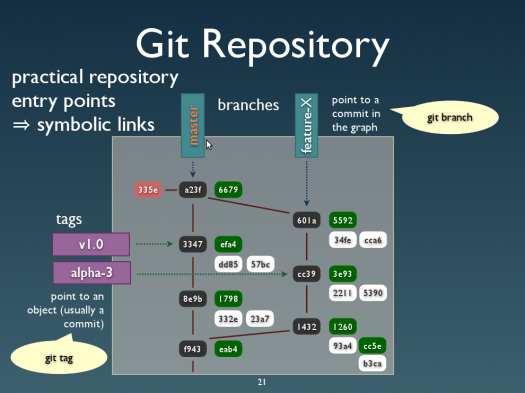
On April 17, I was invited to do a presentation on Git for Purple Scout in Malmö, Sweden. Around 40 people showed up (including many XMMS2 folks) and endured 2-hours on what Git is, why it’s so awesome and all the fancy stuff you can do with it. I think people liked it and although most seemed to be using Git already, they were nice enough to say that they’d learned something anyway.

I’d given talks about Git previously in Switzerland, but for this occasion I reworked and pimped up my slides quite a bit to cover more material and have more cute diagrams. As before, you can get the slides for the Git presentation (PDF), or even fiddle with the source file, under the terms of the Creative Commons Attribution-Share Alike 2.5 License. Reuse, modify or poke fun at at will!

Git repository diagram

Sorry it’s still in proprietary Keynote format, because that’s the only vaguely acceptable software I found to make lots of diagram easily… Any Free alternative would be welcome, if someone knows of one.

It was great fun preparing and giving this course, and being back in Sweden and seeing friends again, so tusen tack till Purple Scout for making this happen!

Hiring Javascript/GUI developer for online music service

The company I’m working at, Playlouder MSP, is looking for a new Javascript developer to join the team. We’re a young and dynamic London-based team working on an online social platform for listening to and sharing music, including unlimited legal access to music for a fixed monthly fee.

Excerpt of the job ad:

Media Service Provider has been working with ISPs and the music industry to offer ISP customers groundbreaking levels of access to digital music—and a groundbreaking user interface to match.

Tasked with delivering an innovative, browser-based music application to a large audience, it’s critical that we are able to deliver a reliable, responsive and fun user experience across a range of modern browsers (no IE6!). As a key addition to our development team, you’ll be central to this effort.

The role would suit a Javascript guru who enjoys the challenge of developing a real thick-client application in the browser. It may equally suit a GUI application developer with solid experience on other platforms (Cocoa, C#, Java, Flash, GTK, …) who’s confident in their ability to pick up the necessary Javascript skills.

So if you’re looking for a job in the UK and interested in music and UI development, have a look at the full job ad for all the details!